Know what to fix. See the evidence.
Margin reviews your website on desktop and mobile, combining usability, accessibility and performance checks with AI-assisted analysis. Every finding shows what was measured, what was observed and what needs further investigation.
What happens in those two minutes
Most AI audit tools look at a screenshot and write advice. Margin runs the page first, then reviews it with the results in hand.
A real browser, desktop and phone
The page is loaded, scrolled and photographed the way a visitor sees it, pop-ups and all.
Two accessibility engines
axe-core and IBM Equal Access test against WCAG 2.2, and Margin marks where they agree.
A keyboard pass
Up to thirty presses of Tab on desktop, checking that focus is visible and lands somewhere sensible. The report says how many stops it reached.
A phone pass
Is the main action on the first screen? Does the page scroll sideways? Does the menu open?
Speed, lab and real
Google Lighthouse, plus how fast the page loads for real Chrome visitors over six months.
Content and search
Reading ease, search snippet, social image and product markup: price, stock and rating.
Your own data, if you connect it
Clarity rage clicks, GA4 drop-off and Search Console queries change what Margin tells you to fix first.
Then a senior review
Claude reads both screenshots with every measured result and writes findings tied to elements on the page.
Why not use a free AI tool?
Published tests of AI tools for UX and conversion advice find that a quarter to a half of their suggestions are wrong, and most tools don't say how accurate they are. A wrong change on a live shop costs real money.
A typical free AI audit
- A screenshot and a prompt
- Advice that sounds right but may not be
- No idea whether a finding was measured or guessed
- Generic best practice, whoever your visitors are
- A list of problems, and the fixing left to you
Margin
- A real browser on desktop and phone, with tests that run on the live page
- Every finding labelled measured, seen or reasoned, with the evidence attached
- Accessibility claims checked against two engines before they reach you
- Priorities shaped by your own analytics and behaviour data
- The fix spelled out: wording, layout, a redesigned screenshot and a ready ticket
- Run it again after you ship and see what's fixed, what's still there and what's new
- A/B test plans with sample sizes, and a WCAG 2.2 AA map you can hand to a developer
It tells you how it knows
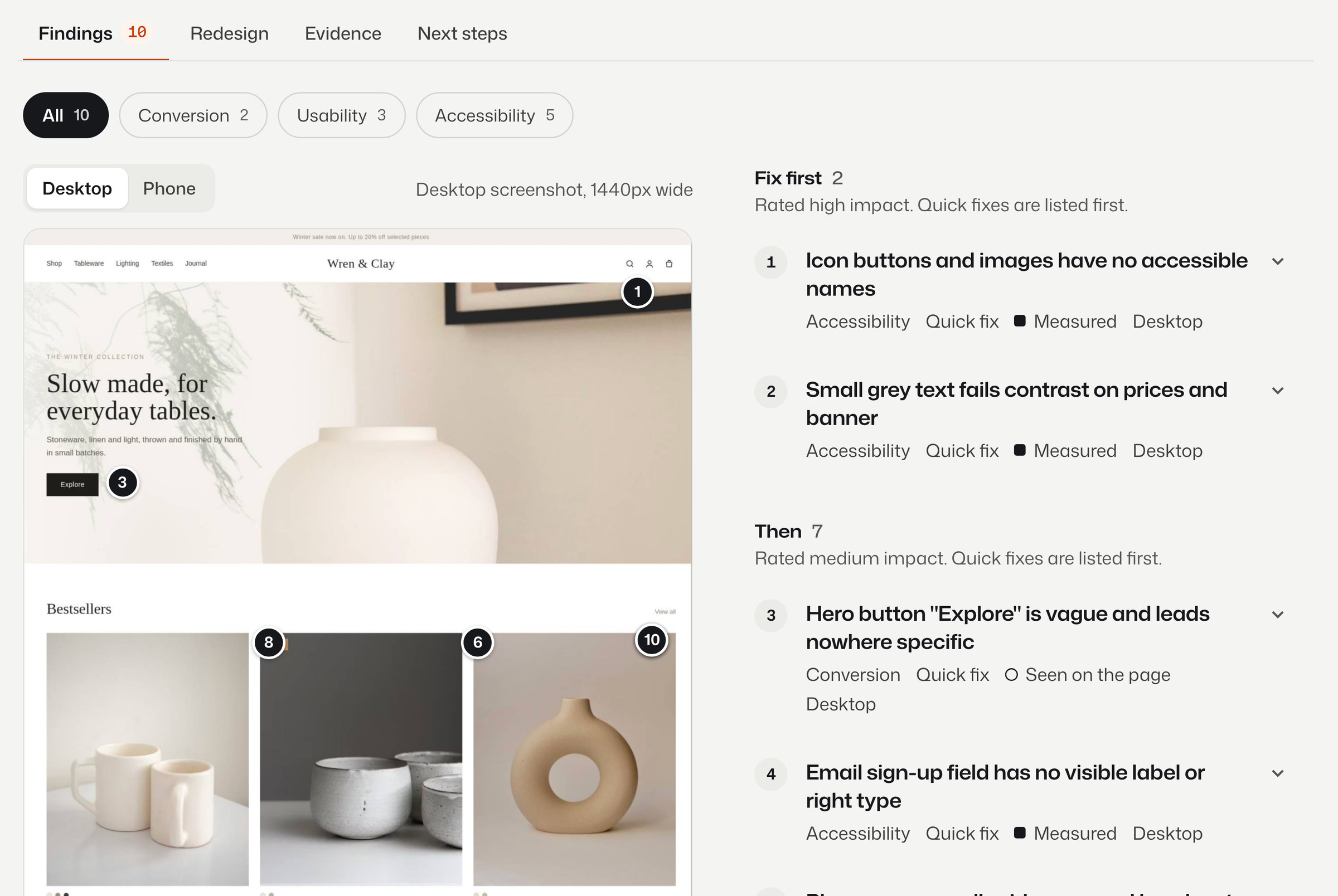
No score out of 100 and no confident guesses. Each finding carries one of three labels, so you know what to trust and what to check.
We're measuring Margin's accuracy the way it should be measured: an experienced UX practitioner rates every finding on a fixed set of real pages as right or wrong. The figure will be published here, whatever it is.
- MeasuredFrom a test that ran on the live page. Margin can show you the numbers.
- SeenVisible on the screenshot, with the element outlined so you can check it.
- ReasonedA judgement call, labelled as one, so you know what to test before you ship.
Who it's for
Shop owners
Find out why visitors look and leave, and what to change first, without hiring an agency to tell you.
Designers and agencies
Start every audit with the evidence gathered and the obvious issues logged, then spend your time on judgement.
Product and growth teams
Check pages before and after a release, review Figma frames before they're built, and walk a whole journey.
Simple credits, no surprises
One credit is one page, one Figma frame or one design upload. A three-page journey with its cross-page review is four credits.
Free
£0To try it
5 credits, once
- Every check and the full report
- Enough for one journey and a page
- No card needed
Plus
Recommended£29per month
40 credits a month
- For shop owners and independent designers
- Figma and design reviews
- Connect Clarity, GA4 and Search Console
Pro
£79per month
150 credits a month
- For consultants, agencies and busy teams
- Everything in Plus
- Competitor comparisons and journeys every week
Paid plans open soon. Every account starts with five free credits.
Audit a page now
A homepage, a product page, a pricing page or a sign-up form. Any public page.